
Tour Guide
To explore the platform’s features and get step-by-step assistance, open the Tour Guide by clicking the question mark icon (?) located in the bottom-left corner of the interface and Take the Tour. The guide will walk you through key tools and workflows directly within the platform.
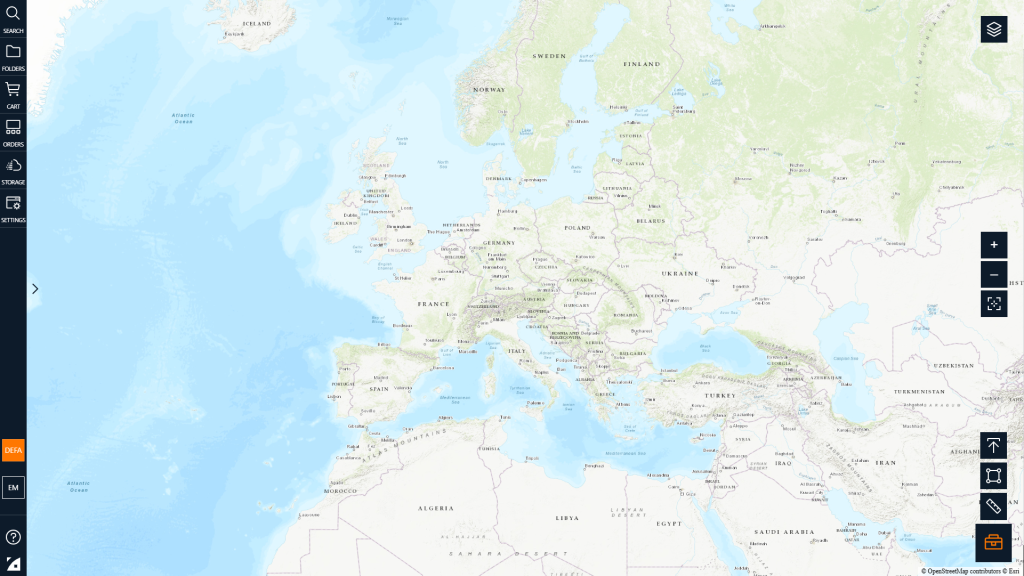
Side Navigation Bar
- Search Bar and Filter Panel: Enter coordinates, location, or image ID to find imagery. Refine results by date, sensor, area off nadir, min./max. sun-elevation, cloud cover, and resolution.
- Folders: use them to organize your AOIs.
- Shopping cart: The current orders and sub-orders waiting in your cart before purchasing.
- Orders: Find detailed information regarding your orders and the orders from projects you are a member of.
- Storage: View and download orders that you’ve selected to be delivered to the EUSI cloud
- User Settings: View and change your projects, end user, delivery site, and API settings.
- Current Project: Displays your current project and allows you to change projects.
- User Account: Displays current version and log-out options.
- Help: Tour, documentation and additional support.
- EUSI Logo: Link to EUSI website.
Map View
- Layers: Toggle available basemaps and map layers.
- Zoom Controls
- Center on Screen: Zooms out to display all current AOIs on the map.
- Upload AOI
- Draw AOI: Draw a rectangle, polygon or centerpoint
- Ruler: Measure distance or area
- Toolbox: Display or hide AOI and measurement tools