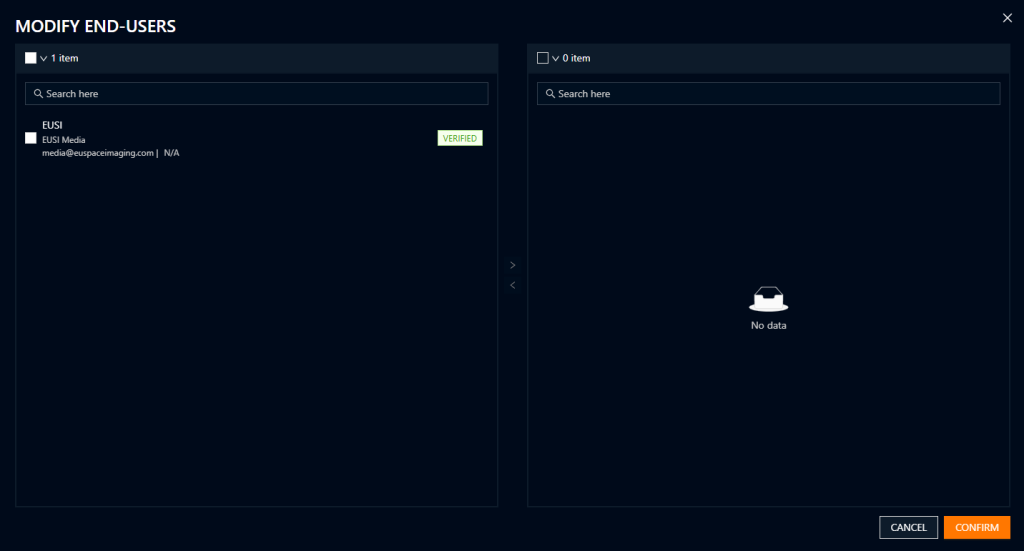
For every order (archive or tasking) users are prompted to select one more ens users. An end user is anyone who has permission to access or use the delivered data in accordance to the license. For more information, please see the Licensing section of the documentation.
Creating/adding an End User
- Click on the “Settings” icon on the side navigation bar.
- Select “Project Management”
- Click “View” next to the project in which you want to add the End User. Note: If no other projects have been created, then you are working within the Default Project.
- Select “Manage End Users”
- Click “Create New” to make a new End User or “Add Existing” to copy one from another project.
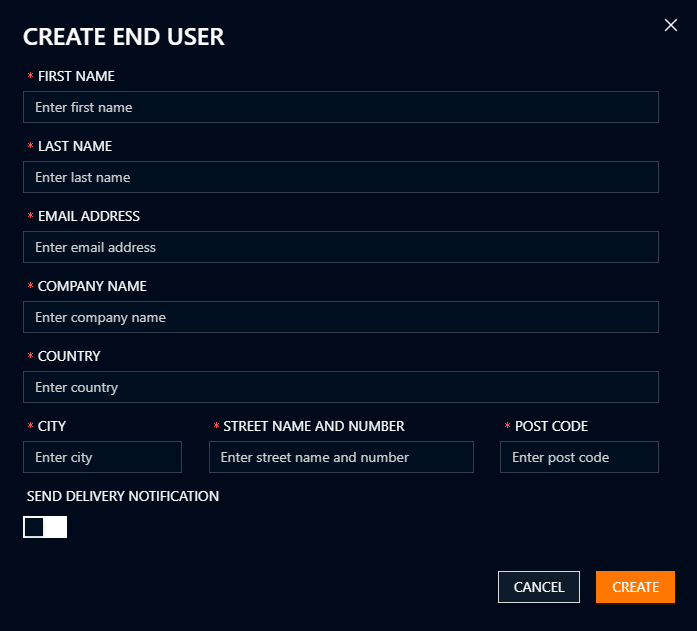
Please allow the EUSI Customer Support team at least 3 business days to verify new End Users. In urgent cases, you can contact the support team for expedited verification.
End Users are tied to projects. For more information about projects, see the “Organizations and Projects” section of the documentation.
Selecting End Users for an Order
When selecting the production parameters, you must select one or more end users for a valid license. The correct license will be automatically applied depending on how many end users you select. For more information, please see the “Licensing” section of the documentation.
- In the End User selection tool, search and select the End User(s) on the left and click the arrow pointing right to add them to the order.
- Once added, they will appear on the right side of the tool. They can be selected and removed again by clicking the arrow pointing left.
- Click “Confirm” once all the relevant End Users for the order appear on the right side of the tool.